
How to Check and Update Your Pet's Microchip Details in the UK
On this page
Quick answer
Locate your pet's microchip number, identify the government-compliant database holding the record, and sign in or contact that database to confirm your name, address, phone, email, and keeper status. Update the record after moving, changing contact details, or rehoming. If you cannot find the number, ask a vet, dog warden, or rescue centre to scan the pet, then contact the database directly.

Pet Blu
1A, Arndale Houses, Durham Rd, Birtley, Chester-le-Street DH3 2PG, UK
How pet microchipping works
A pet microchip is a small implanted identifier that returns a unique number when read by a compatible scanner. The chip does not normally contain the keeper's address or work like GPS. A scanner user follows the number to the registered database, where authorised processes can help connect the pet with current keeper contact details.
A working chip with an outdated or unregistered database record may not reunite a pet quickly. Implantation, registration, and keeping the database details current are separate tasks.

Current dog and cat rules
- Dogs: GOV.UK states that dogs across the UK must generally be microchipped and registered by 8 weeks old.
- Cats in England: Cats must generally be microchipped and registered by 20 weeks old, including cats that normally remain indoors.
- Cats elsewhere in the UK: GOV.UK currently describes cat microchipping as optional in Scotland, Wales and Northern Ireland, though it can improve identification. Check the current devolved-nation rules.
- Exemptions: Limited health-related exemptions may apply through the required professional process; do not assume a pet is exempt.
Dogs must still meet applicable collar-and-tag rules in public. A microchip does not replace visible identification.
Find the microchip number
Check the microchip certificate, vet record, pet passport, adoption documents, insurance papers, or prior database messages. Copy the entire number carefully without adding spaces or guessing missing digits.
If it cannot be found, ask a veterinary practice, dog warden, or rescue centre to scan the animal. A scan can confirm the number but may not by itself prove keeper ownership or grant access to private database information.
Find the registered database
- Use the current GOV.UK microchipping page to view compliant databases and its method for checking a chip number.
- Enter the number only through a trusted lookup or contact the implanting practice for guidance.
- When the database is identified, navigate to its official website independently and verify the domain and contact information.
- Create or recover the keeper account using the database's identity checks.
- If no compliant record is found, contact the database or vet rather than paying an unsolicited service.
Beware of emails or sites claiming registration on a database that does not meet government standards. GOV.UK warns that unexpected requests for payment from other databases may be scams.
Update keeper details
- Confirm the keeper's full name and current home address.
- Add a reliable mobile number and email address, plus any permitted secondary contact.
- Correct the pet's name, species, sex, breed description, colour, and status when the database allows.
- Complete the formal change-of-keeper process when acquiring or rehoming a pet; do not merely edit a phone number.
- Mark a pet lost, stolen, recovered, or deceased through the database's appropriate process.
- Save confirmation, account access details, database name, and the chip number in a secure place.
A database may charge for some update or membership services. Review what is mandatory, what is optional, and whether a one-off or recurring charge applies before paying.
Arrange a scan check
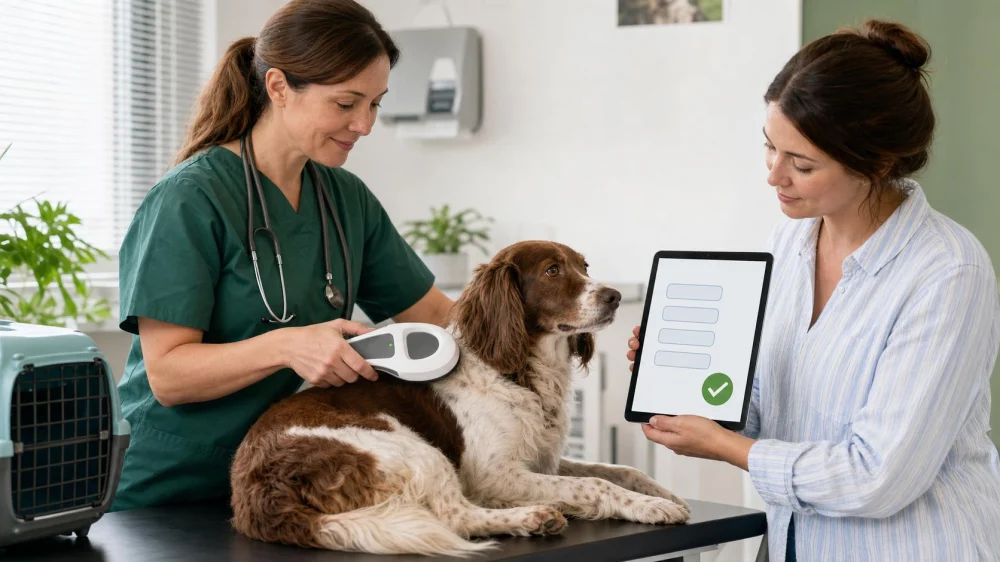
Ask a vet to scan at a routine visit, after adoption, before travel paperwork, or when records conflict. The scanner should check the usual implant area and follow a suitable scan pattern because chips can migrate. Confirm that the scanned number exactly matches the certificate and database record.
If no chip is detected or two numbers appear, the vet can document the result and advise on investigation, re-implantation, and record correction. Do not implant another chip without addressing the existing record.
If a pet is lost or stolen
- Contact the registered database immediately and mark the pet missing.
- Verify that all contact details are current and that calls from unknown numbers can reach you.
- Notify local vets, rescue centres, dog wardens or councils, and other appropriate services.
- Provide a current photo, description, last known location, temperament, collar details, and microchip number through secure channels.
- Keep evidence of reports and update the database promptly when the pet is found.
Do not publish passwords, full home-security details, or unnecessary ownership documents. Be cautious of callers demanding immediate payment to return a pet; verify claims safely.
Limitations and important notes
Rules differ across England, Scotland, Wales, and Northern Ireland and may change. This article summarises current GOV.UK guidance and is not legal advice. Check the current government page and relevant local authority when applying the rules to a particular pet.
Microchipping supports identification but cannot prevent theft, guarantee scanning, or show a live location. Use secure handling, suitable collars and tags, controlled access, current photos, and prompt reporting as additional safeguards.
Frequently asked questions
Does a microchip track my pet's location?
No. A standard pet microchip provides an identification number when scanned; it is not a GPS tracker.
How do I know which database has the record?
Use the chip number and the checking route linked from current GOV.UK guidance, or ask the implanting vet. Then contact the identified database directly.
Do indoor cats in England need microchips?
Yes, GOV.UK states that the England requirement includes cats that usually stay indoors, subject to applicable exemptions.
Do I need to update the chip when I move?
Yes. Contact the registered database and update the keeper address and contact details. Updating your veterinary practice alone does not necessarily update the database.
Can a new owner simply register the same chip?
The database's formal change-of-keeper process should be followed. Both parties may need to provide information, and a fee may apply.
Sources and evidence notes
The current GOV.UK dog and cat microchipping guidance describes age requirements, compliant database registration, keeper responsibility for updates, how to obtain a scan, proof when acquiring a pet, and scam cautions. Pet travel has additional sequencing and documentation rules covered separately by official guidance.
Next steps
Find your pet's chip number today and record the database name. Log in through the official database site, confirm every contact field, and save the update confirmation. At the next veterinary visit, ask for a scan so the number in the pet matches the record you maintain.




 Pets Corner4.0 (330 reviews)
 Foxhall Veterinary Clinic4.0 (191 reviews)
 Ferris Claire4.0 (442 reviews)
 Raw Superstore @ Doggroom4.0 (21 reviews)
 Barwell Cattery4.0 (21 reviews)
 Carnforth Pet Care - Veterinary Centre4.0 (111 reviews)
 The Importance of Behaviour Training for Hamsters – UK Edition
 Seasonal Health Tips for Guinea Pigs: Essential Care Advice for UK Pet Owners
 Expert Vet Advice on Health Checkups for Puppies
 Complete Guide to Preventive Care for Exotic Pets
 Top 10 Common Illnesses Every Fish Owner in the UK Should Know
 Top 10 Puppy and Kitten Care Tips Every Bird Owner in the UK Should Know